> ## Documentation Index
> Fetch the complete documentation index at: https://docs.metabind.ai/llms.txt
> Use this file to discover all available pages before exploring further.
# LLM provider configuration
> Choose how the Assistant SDK reaches an LLM — Metabind's Agent proxy or BYOK direct mode
The Assistant SDK is provider-pluggable through an `LLMProvider` abstraction. Two implementations ship today:
* **`MetabindAgentProvider`** — calls Metabind's hosted **Agent proxy** at `agent.metabind.ai`. The proxy holds the LLM key, runs the tool loop server-side, and streams responses back as SSE. **Recommended for production.**
* **`AnthropicProvider`** — bring-your-own-key (BYOK). The SDK calls Anthropic directly from the client. Useful for development, internal tools, or apps where the key reaches the SDK from an authenticated user-managed source.
You can also implement the public `LLMProvider` protocol to plug in something else.
## When to pick which
| Mode | Pick when |
| - | - |
| Agent proxy (`MetabindAgentProvider`) | Production. Your binary ships only a Metabind project token; the LLM key stays on the server. The proxy authenticates the project token, calls the LLM, runs the tool loop, and streams results back. |
| BYOK direct (`AnthropicProvider`) | Local development. Internal tools where the key is provisioned per user from a trusted source. You explicitly want a different LLM provider, region, or routing policy than the proxy offers. |
On iOS, the two modes are interchangeable from the rest of the SDK's perspective — the same assistant setup and conversation state. Only the provider object changes. Android supports only the Agent proxy: its `MetabindAssistant` takes `apiKey`, `orgId`, and `projectId` and has no provider parameter. See the [Android SDK](/guides/assistant-sdk/android-sdk).
## Mode 1: Agent proxy (recommended)
The Agent proxy is a Metabind-managed service at `https://agent.metabind.ai`. SDKs call `POST https://agent.metabind.ai/{orgId}/{projectId}/chat` with a Bearer-authenticated streaming request. The proxy authenticates the caller with a Metabind project token, runs the LLM call and the tool loop on the server side, and returns the result as a Server-Sent Events stream. `orgId` and `projectId` must be IDs, not slugs; see [Find your organization and project IDs](/guides/getting-started/embed-an-assistant#find-your-organization-and-project-ids).
 What you ship in the binary: a Metabind project token. What you don't ship: any third-party LLM key.
```swift theme={null}
import MetabindAI
let orgId = ""
let projectId = ""
let assistant = MetabindAssistant(
serverURL: URL(string: "https://mcp.metabind.ai/\(orgId)/projects/\(projectId)")!,
serverHeaders: ["Authorization": "Bearer \(projectToken)"],
provider: MetabindAgentProvider(
apiKey: projectToken,
orgId: orgId,
projectId: projectId
)
)
```
```kotlin theme={null}
import ai.metabind.ai.MetabindAssistant
// Android always uses the Agent proxy.
val assistant = MetabindAssistant(
apiKey = projectToken,
orgId = "",
projectId = ""
)
```
The `apiKey` argument (on `MetabindAgentProvider` on iOS, on `MetabindAssistant` on Android) is the **Metabind project token**, not an LLM provider key. The proxy uses it to authenticate the project; the LLM key is held server-side.
### What the proxy does
* Authenticates the request with the project token (Bearer header).
* Routes to the LLM provider configured for the project.
* Runs the tool-call loop server-side: when the LLM emits a tool call, the proxy invokes the project's MCP tool, returns the result to the LLM, and continues until the LLM produces a final answer.
* Streams events back to the client over SSE — `message_start` (includes `conversationId`), `text_delta`, `tool_use`, `tool_result`, `provider_switch`, `message_stop`.
The client never holds the LLM key, never knows which provider answered, and doesn't run a tool loop locally — that simplifies clients and makes provider switches a server-side decision.
### Server-side provider selection
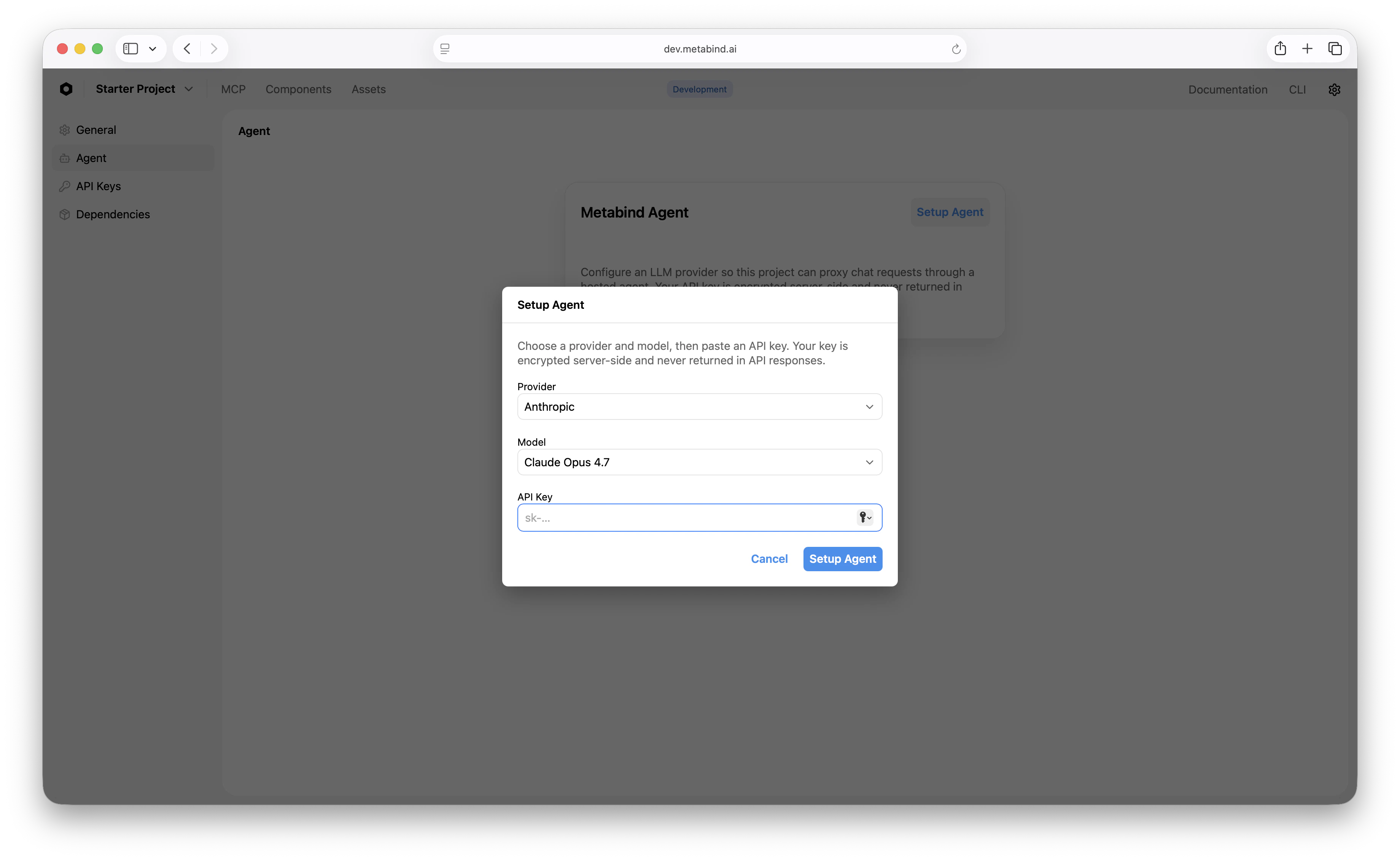
The proxy is multi-provider. Each project picks one of the supported providers in Metabind Studio: **Anthropic**, **OpenAI**, or **Google**. The provider, model, and key are all configured server-side; the client just sees an SSE stream. To switch providers for an entire project, change the setting in Metabind Studio — no client release needed.
What you ship in the binary: a Metabind project token. What you don't ship: any third-party LLM key.
```swift theme={null}
import MetabindAI
let orgId = ""
let projectId = ""
let assistant = MetabindAssistant(
serverURL: URL(string: "https://mcp.metabind.ai/\(orgId)/projects/\(projectId)")!,
serverHeaders: ["Authorization": "Bearer \(projectToken)"],
provider: MetabindAgentProvider(
apiKey: projectToken,
orgId: orgId,
projectId: projectId
)
)
```
```kotlin theme={null}
import ai.metabind.ai.MetabindAssistant
// Android always uses the Agent proxy.
val assistant = MetabindAssistant(
apiKey = projectToken,
orgId = "",
projectId = ""
)
```
The `apiKey` argument (on `MetabindAgentProvider` on iOS, on `MetabindAssistant` on Android) is the **Metabind project token**, not an LLM provider key. The proxy uses it to authenticate the project; the LLM key is held server-side.
### What the proxy does
* Authenticates the request with the project token (Bearer header).
* Routes to the LLM provider configured for the project.
* Runs the tool-call loop server-side: when the LLM emits a tool call, the proxy invokes the project's MCP tool, returns the result to the LLM, and continues until the LLM produces a final answer.
* Streams events back to the client over SSE — `message_start` (includes `conversationId`), `text_delta`, `tool_use`, `tool_result`, `provider_switch`, `message_stop`.
The client never holds the LLM key, never knows which provider answered, and doesn't run a tool loop locally — that simplifies clients and makes provider switches a server-side decision.
### Server-side provider selection
The proxy is multi-provider. Each project picks one of the supported providers in Metabind Studio: **Anthropic**, **OpenAI**, or **Google**. The provider, model, and key are all configured server-side; the client just sees an SSE stream. To switch providers for an entire project, change the setting in Metabind Studio — no client release needed.
 ### Conversation IDs
The first event of every response (`message_start`) includes a `conversationId`. The proxy keeps each conversation's model context server-side for one hour after its last turn. A `chat` request that echoes the `conversationId` within that hour continues from that context; after it, the proxy has no earlier context for that ID. The proxy has no endpoint for reading a conversation's history.
* **iOS:** `MetabindAgentProvider` echoes the ID on each turn while the assistant is alive. To resume after a relaunch, save `currentConversationId` and pass it to `MetabindAgentProvider(conversationId:)` when you create the next assistant. This restores the model's context, not the on-screen transcript: `assistant.conversation.messages` starts empty.
* **Android:** the SDK has no API to read or set the conversation ID. Each `MetabindAssistant` starts a new conversation, and `reset()` starts another.
## Mode 2: BYOK direct (Anthropic)
BYOK direct mode **bypasses the Agent proxy entirely**. The client calls Anthropic with a key you provide and runs the tool loop locally. Use this for development, internal tools, or apps where the key reaches the SDK from a trusted source.
```swift theme={null}
import MetabindAI
let assistant = MetabindAssistant(
serverURL: URL(string: "https://mcp.metabind.ai/\(orgId)/projects/\(projectId)")!,
serverHeaders: ["Authorization": "Bearer \(projectToken)"],
provider: AnthropicProvider(
apiKey: anthropicKey,
model: "claude-sonnet-4-6"
)
)
```
In this mode, the client runs the tool loop itself — calls the LLM, receives tool requests, calls the MCP server, returns the tool results to the LLM, and so on.
Do not ship a real Anthropic API key in a production app — anyone can extract it from the binary or DevTools. BYOK mode is appropriate for local development, internal tooling, or apps where the key is delivered to the SDK from an authenticated user-managed source. For public-facing production, prefer the Agent proxy.
## Custom providers
Conform to the public `LLMProvider` protocol if you need to integrate something else — an internal LLM endpoint, a fine-tuned model, a different vendor. The protocol is small: a streaming method that takes messages and tool definitions and emits chunks in the SDK's chunk format.
```swift theme={null}
public protocol LLMProvider: Sendable {
func stream(
messages: [LLMMessage],
tools: [LLMTool]?,
systemPrompt: String?
) -> AsyncStream
var runsToolsRemotely: Bool { get }
func resetConversation() async
}
```
The exact signature varies by platform; see the per-platform headers for the concrete types.
## Keys at a glance
| Key | Where it lives | What it gates |
| - | - | - |
| **Metabind project token** | Your backend (mint per user / per session). Reaches the SDK via your auth flow. | Listing and calling tools on your project; authenticating to the Agent proxy. |
| **LLM provider API key** | **Agent proxy mode:** server-side, never in the client. **BYOK direct mode:** delivered to the SDK by your auth flow, ideally short-lived. | Conversational generation. |
For production, mint Metabind project tokens server-side and refresh as needed. On iOS and Android, an assistant keeps the key it was created with: `apiKey` is a constant on `MetabindAgentProvider` and `AnthropicProvider` on iOS, and on `MetabindAssistant` on Android. To switch to a new key, create a new assistant with it. On Android, call `close()` on the old `MetabindAssistant`. On iOS, to keep the model's context, pass the old provider's `currentConversationId` to the new `MetabindAgentProvider(conversationId:)`. On the web, `agent.apiKey` can be a function, which the SDK calls for each request; see the [Web SDK](/guides/assistant-sdk/web-sdk).
## Choosing a model
The Agent proxy decides the model server-side, configured per project in Metabind Studio. For BYOK, pass the model string explicitly to `AnthropicProvider`. A few rough heuristics for either mode:
* **Default to mid-tier.** Sonnet 4.6 is well-priced and capable enough for most assistant workloads.
* **Scale up for hard reasoning.** When tool selection requires multi-step thinking or your tool set is large (50+ tools), upgrade to Opus 4.7.
* **Scale down for simple flows.** If your assistant calls one of three tools and replies in a sentence, a smaller model saves cost without quality loss.
Test multiple models with your actual prompts before committing — model-to-prompt fit varies more than benchmarks suggest.
## Per-user metering
Once requests go through the Agent proxy, Metabind's usage tracking captures tokens per project token. If you mint per-user project tokens, the audit trail naturally segments by user.
For BYOK direct mode, you're metering against your own LLM key — use the provider's dashboard or a backend proxy you control.
## Troubleshooting
| Symptom | Likely cause |
| - | - |
| All requests 401 | Project token expired or the proxy can't validate it; refresh logic broken. |
| SSE stream closes immediately | Proxy rejected the request — check that the project token has access to the MCP project. |
| Tool selection feels wrong | Sharpen tool descriptions in Metabind Studio, or upgrade to a more capable model. |
| BYOK Anthropic 401 | Key invalid or expired; check the provider's dashboard. |
## Related
Where the LLM provider plugs in for iOS.
Where the LLM provider plugs in for Android.
What the Assistant SDK is and which surface to pick.
Replace the default chat UI with your own.
This documentation is built and hosted on [Mintlify](https://mintlify.com), a developer documentation platform.
### Conversation IDs
The first event of every response (`message_start`) includes a `conversationId`. The proxy keeps each conversation's model context server-side for one hour after its last turn. A `chat` request that echoes the `conversationId` within that hour continues from that context; after it, the proxy has no earlier context for that ID. The proxy has no endpoint for reading a conversation's history.
* **iOS:** `MetabindAgentProvider` echoes the ID on each turn while the assistant is alive. To resume after a relaunch, save `currentConversationId` and pass it to `MetabindAgentProvider(conversationId:)` when you create the next assistant. This restores the model's context, not the on-screen transcript: `assistant.conversation.messages` starts empty.
* **Android:** the SDK has no API to read or set the conversation ID. Each `MetabindAssistant` starts a new conversation, and `reset()` starts another.
## Mode 2: BYOK direct (Anthropic)
BYOK direct mode **bypasses the Agent proxy entirely**. The client calls Anthropic with a key you provide and runs the tool loop locally. Use this for development, internal tools, or apps where the key reaches the SDK from a trusted source.
```swift theme={null}
import MetabindAI
let assistant = MetabindAssistant(
serverURL: URL(string: "https://mcp.metabind.ai/\(orgId)/projects/\(projectId)")!,
serverHeaders: ["Authorization": "Bearer \(projectToken)"],
provider: AnthropicProvider(
apiKey: anthropicKey,
model: "claude-sonnet-4-6"
)
)
```
In this mode, the client runs the tool loop itself — calls the LLM, receives tool requests, calls the MCP server, returns the tool results to the LLM, and so on.
Do not ship a real Anthropic API key in a production app — anyone can extract it from the binary or DevTools. BYOK mode is appropriate for local development, internal tooling, or apps where the key is delivered to the SDK from an authenticated user-managed source. For public-facing production, prefer the Agent proxy.
## Custom providers
Conform to the public `LLMProvider` protocol if you need to integrate something else — an internal LLM endpoint, a fine-tuned model, a different vendor. The protocol is small: a streaming method that takes messages and tool definitions and emits chunks in the SDK's chunk format.
```swift theme={null}
public protocol LLMProvider: Sendable {
func stream(
messages: [LLMMessage],
tools: [LLMTool]?,
systemPrompt: String?
) -> AsyncStream
var runsToolsRemotely: Bool { get }
func resetConversation() async
}
```
The exact signature varies by platform; see the per-platform headers for the concrete types.
## Keys at a glance
| Key | Where it lives | What it gates |
| - | - | - |
| **Metabind project token** | Your backend (mint per user / per session). Reaches the SDK via your auth flow. | Listing and calling tools on your project; authenticating to the Agent proxy. |
| **LLM provider API key** | **Agent proxy mode:** server-side, never in the client. **BYOK direct mode:** delivered to the SDK by your auth flow, ideally short-lived. | Conversational generation. |
For production, mint Metabind project tokens server-side and refresh as needed. On iOS and Android, an assistant keeps the key it was created with: `apiKey` is a constant on `MetabindAgentProvider` and `AnthropicProvider` on iOS, and on `MetabindAssistant` on Android. To switch to a new key, create a new assistant with it. On Android, call `close()` on the old `MetabindAssistant`. On iOS, to keep the model's context, pass the old provider's `currentConversationId` to the new `MetabindAgentProvider(conversationId:)`. On the web, `agent.apiKey` can be a function, which the SDK calls for each request; see the [Web SDK](/guides/assistant-sdk/web-sdk).
## Choosing a model
The Agent proxy decides the model server-side, configured per project in Metabind Studio. For BYOK, pass the model string explicitly to `AnthropicProvider`. A few rough heuristics for either mode:
* **Default to mid-tier.** Sonnet 4.6 is well-priced and capable enough for most assistant workloads.
* **Scale up for hard reasoning.** When tool selection requires multi-step thinking or your tool set is large (50+ tools), upgrade to Opus 4.7.
* **Scale down for simple flows.** If your assistant calls one of three tools and replies in a sentence, a smaller model saves cost without quality loss.
Test multiple models with your actual prompts before committing — model-to-prompt fit varies more than benchmarks suggest.
## Per-user metering
Once requests go through the Agent proxy, Metabind's usage tracking captures tokens per project token. If you mint per-user project tokens, the audit trail naturally segments by user.
For BYOK direct mode, you're metering against your own LLM key — use the provider's dashboard or a backend proxy you control.
## Troubleshooting
| Symptom | Likely cause |
| - | - |
| All requests 401 | Project token expired or the proxy can't validate it; refresh logic broken. |
| SSE stream closes immediately | Proxy rejected the request — check that the project token has access to the MCP project. |
| Tool selection feels wrong | Sharpen tool descriptions in Metabind Studio, or upgrade to a more capable model. |
| BYOK Anthropic 401 | Key invalid or expired; check the provider's dashboard. |
## Related
Where the LLM provider plugs in for iOS.
Where the LLM provider plugs in for Android.
What the Assistant SDK is and which surface to pick.
Replace the default chat UI with your own.
This documentation is built and hosted on [Mintlify](https://mintlify.com), a developer documentation platform.