> ## Documentation Index
> Fetch the complete documentation index at: https://docs.metabind.ai/llms.txt
> Use this file to discover all available pages before exploring further.
# Team management
> Organization roles, invitations, and access in Metabind Studio
Metabind organizes work into **organizations** (your company or workspace) and **projects** (an MCP App and its server). Roles and role assignments are defined at the **organization** level today — every member of an organization has access to every project in it, with the permissions their organization role grants.
## Organizations and projects
 If you need a user to have access to only some of your projects, put each restricted set of projects in its own organization.
## System roles
Eight roles are seeded for every organization. Six are general-purpose (Owner, Admin, Developer, Editor, Viewer, Content Writer); two are MCP-specific (MCP User, MCP Developer).
| Role | What it does | Use for |
| - | - | - |
| **Owner** | Full organization control — billing, transfer, delete, plus everything below. | The person who created the organization. |
| **Admin** | Full administrative access except deleting the org. Manages projects, users, roles, and API keys. | Trusted operators. |
| **Developer** | Build components and packages, manage API keys, test draft tools. Cannot publish content. | Engineers building MCP Apps. |
| **Editor** | Manage content with publishing rights. Cannot edit components or packages. | Content/editorial staff. |
| **Content Writer** | Create and edit content drafts. Cannot publish. | Contributors who need review. |
| **Viewer** | Read-only access to everything in the organization. | Stakeholders who need visibility. |
| **MCP User** | Tool-only access to a private MCP project's production endpoint. No CMS visibility. | Internal staff using a Metabind-hosted assistant via SSO. |
| **MCP Developer** | MCP User access plus draft endpoint testing and Type visibility. | Internal developers or contractors validating unpublished tools. |
Admin, Developer, Editor, Viewer, Content Writer, MCP User, and MCP Developer are editable role templates — the seeded permission shape is the recommended starting point, but Admins can adjust them per organization.
**Owner is a protected system role.** It cannot be modified or deleted. If you need a different shape, create a custom role.
## Custom roles
Admins can create custom roles in **Settings → Roles** with arbitrary permission combinations across resources (`organizations`, `projects`, `users`, `roles`, `apiKeys`, `components`, `packages`, `contentTypes`, `content`, `assets`, `mcp`). The full permission model is documented in [REST API: roles](/rest/roles/overview).
## Inviting members
In Metabind Studio:
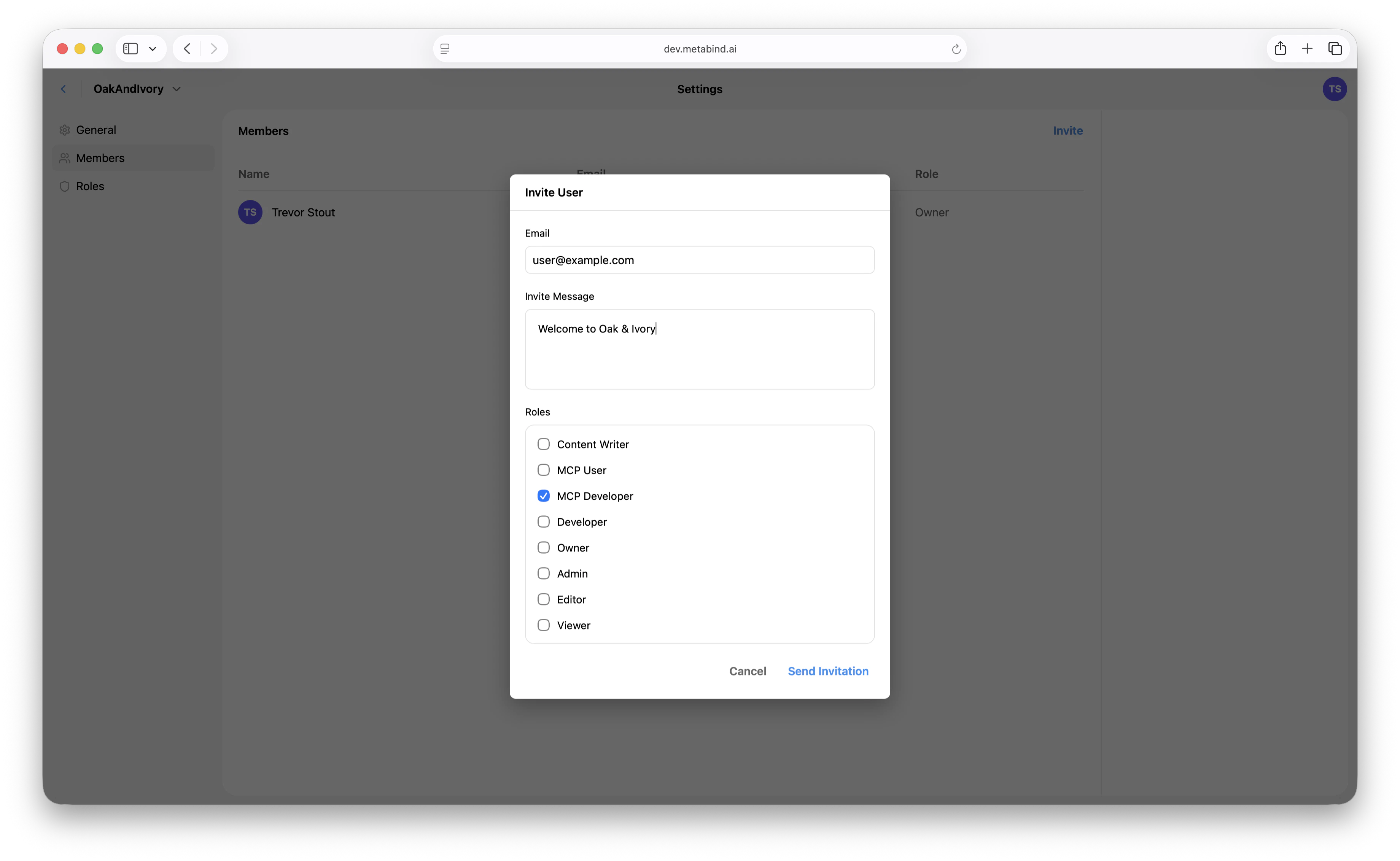
1. Open **Settings → Members** at the organization level.
2. Click **Invite**.
3. Enter the email and pick the roles the user will hold across the organization.
4. The invitee receives an email with a link to accept.
Invitations expire after 7 days; resend from the same screen.
If you need a user to have access to only some of your projects, put each restricted set of projects in its own organization.
## System roles
Eight roles are seeded for every organization. Six are general-purpose (Owner, Admin, Developer, Editor, Viewer, Content Writer); two are MCP-specific (MCP User, MCP Developer).
| Role | What it does | Use for |
| - | - | - |
| **Owner** | Full organization control — billing, transfer, delete, plus everything below. | The person who created the organization. |
| **Admin** | Full administrative access except deleting the org. Manages projects, users, roles, and API keys. | Trusted operators. |
| **Developer** | Build components and packages, manage API keys, test draft tools. Cannot publish content. | Engineers building MCP Apps. |
| **Editor** | Manage content with publishing rights. Cannot edit components or packages. | Content/editorial staff. |
| **Content Writer** | Create and edit content drafts. Cannot publish. | Contributors who need review. |
| **Viewer** | Read-only access to everything in the organization. | Stakeholders who need visibility. |
| **MCP User** | Tool-only access to a private MCP project's production endpoint. No CMS visibility. | Internal staff using a Metabind-hosted assistant via SSO. |
| **MCP Developer** | MCP User access plus draft endpoint testing and Type visibility. | Internal developers or contractors validating unpublished tools. |
Admin, Developer, Editor, Viewer, Content Writer, MCP User, and MCP Developer are editable role templates — the seeded permission shape is the recommended starting point, but Admins can adjust them per organization.
**Owner is a protected system role.** It cannot be modified or deleted. If you need a different shape, create a custom role.
## Custom roles
Admins can create custom roles in **Settings → Roles** with arbitrary permission combinations across resources (`organizations`, `projects`, `users`, `roles`, `apiKeys`, `components`, `packages`, `contentTypes`, `content`, `assets`, `mcp`). The full permission model is documented in [REST API: roles](/rest/roles/overview).
## Inviting members
In Metabind Studio:
1. Open **Settings → Members** at the organization level.
2. Click **Invite**.
3. Enter the email and pick the roles the user will hold across the organization.
4. The invitee receives an email with a link to accept.
Invitations expire after 7 days; resend from the same screen.
 ## Project access
Every member of an organization can see every project in the organization, scoped by what their organization role permits. There is no per-project membership step today — adding a user to the organization is what gives them project access.
The server data model has a narrow project-level role assignment slot (`project.permissions.roles.admin/editor`) that engineering uses internally, but it is not exposed in Metabind Studio and is not part of the supported workflow. Treat organization role as the granularity you can actually configure.
## Changing roles
A user can hold several organization-level roles. Change them in **Settings → Members** by opening their row. The change is effective immediately and applies to every project in the organization.
Demoting a user revokes the relevant capabilities on their next request — including in-flight publish or write attempts.
## Removing members
Same screen. Removing a member revokes their access to the entire organization and every project in it.
## API keys vs. JWT login (machine and programmatic access)
Metabind supports two distinct access patterns for non-interactive callers:
| | **API keys** | **JWT login** |
| - | - | - |
| Scope | One specific project | Full user access (everything the user can do) |
| Auth | `x-api-key` header | `Authorization: Bearer ` |
| What it can do | **Read** published content, components, packages, assets, content types, tags, saved searches. Subscribe to published-resource events. **Cannot** create, modify, or delete anything. | Anything the user's role allows. Drafts, publishes, role changes, etc. |
| Refresh | Long-lived; revocable | Issued by Cognito; refresh tokens, expiries managed by the auth flow |
| Right pattern for | Mobile/web client apps reading published content. Public-facing integrations that don't need write access. | Admin tooling, CI/CD pipelines that publish or modify resources, full-API scripts. |
**To create an API key:**
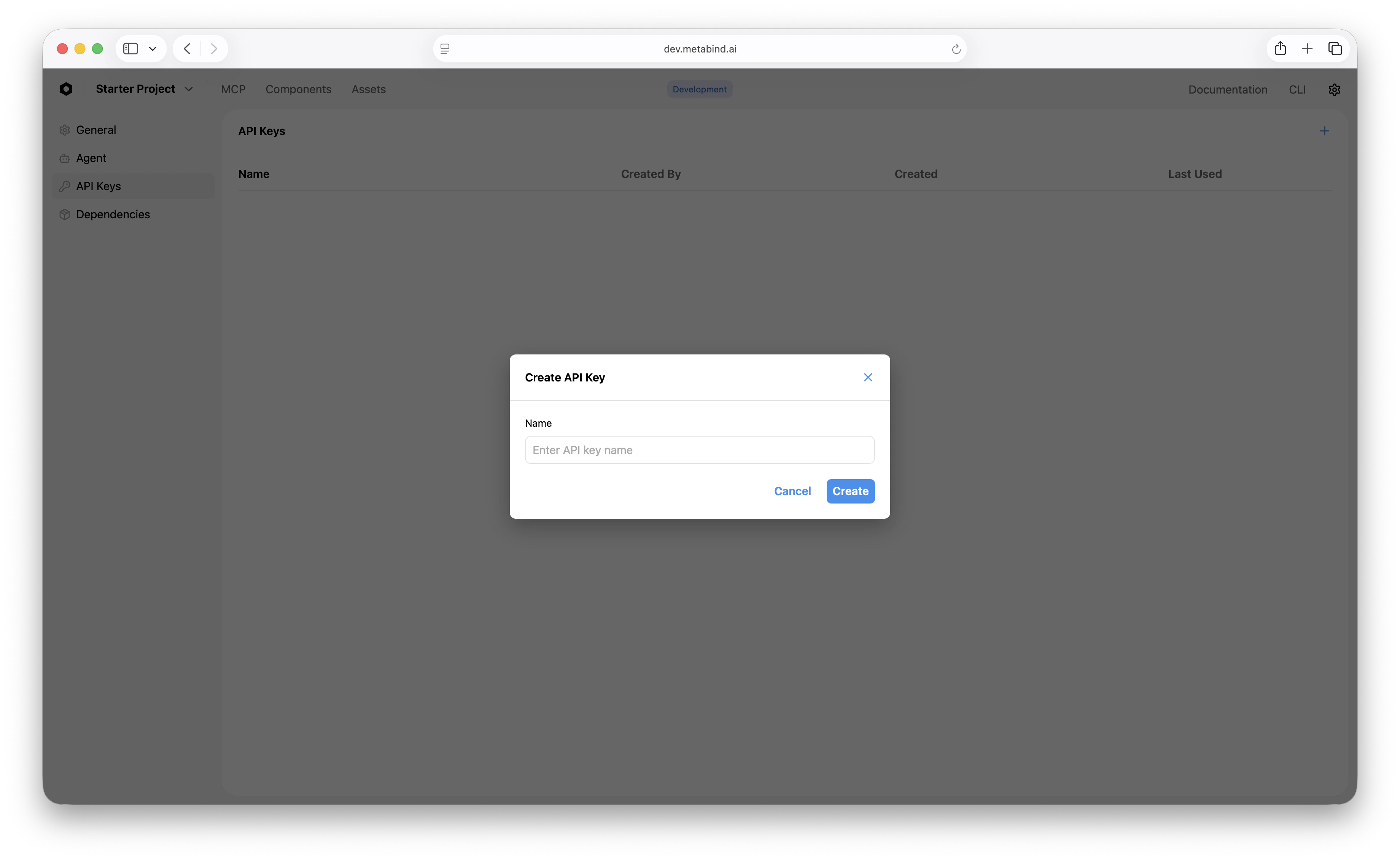
1. Open **Settings → API Keys** on the project.
2. Click **Create API key**.
3. Copy the key — it's shown once.
## Project access
Every member of an organization can see every project in the organization, scoped by what their organization role permits. There is no per-project membership step today — adding a user to the organization is what gives them project access.
The server data model has a narrow project-level role assignment slot (`project.permissions.roles.admin/editor`) that engineering uses internally, but it is not exposed in Metabind Studio and is not part of the supported workflow. Treat organization role as the granularity you can actually configure.
## Changing roles
A user can hold several organization-level roles. Change them in **Settings → Members** by opening their row. The change is effective immediately and applies to every project in the organization.
Demoting a user revokes the relevant capabilities on their next request — including in-flight publish or write attempts.
## Removing members
Same screen. Removing a member revokes their access to the entire organization and every project in it.
## API keys vs. JWT login (machine and programmatic access)
Metabind supports two distinct access patterns for non-interactive callers:
| | **API keys** | **JWT login** |
| - | - | - |
| Scope | One specific project | Full user access (everything the user can do) |
| Auth | `x-api-key` header | `Authorization: Bearer ` |
| What it can do | **Read** published content, components, packages, assets, content types, tags, saved searches. Subscribe to published-resource events. **Cannot** create, modify, or delete anything. | Anything the user's role allows. Drafts, publishes, role changes, etc. |
| Refresh | Long-lived; revocable | Issued by Cognito; refresh tokens, expiries managed by the auth flow |
| Right pattern for | Mobile/web client apps reading published content. Public-facing integrations that don't need write access. | Admin tooling, CI/CD pipelines that publish or modify resources, full-API scripts. |
**To create an API key:**
1. Open **Settings → API Keys** on the project.
2. Click **Create API key**.
3. Copy the key — it's shown once.
 API keys are stored SHA-256 hashed in DynamoDB and revocable at any time.
**For JWT-based programmatic access**, log in as a user (or service-style user account) and pass the issued JWT. Metabind doesn't currently expose a separate "service account" entity — the recommendation is to create a dedicated user with an appropriately scoped role (e.g., a Developer role with API key permissions but no billing rights) and use its JWT.
For the full reference, see [REST API: API Keys](/rest/api-keys/overview).
## SSO and SAML
For organizations on the Enterprise plan, SSO via SAML 2.0 (and OIDC for Azure AD / Google Workspace) is supported. Once connected, organization membership is provisioned by your identity provider, and removing a user from your IdP automatically removes them from Metabind on next session check.
See [SSO and SAML](/guides/operations/sso-saml) for the full setup.
## Best practices
* **Default to Viewer or Content Writer for new joiners.** Promote when they need it.
* **Use API keys for client apps** that only need to read published content. JWT login is overkill and exposes more surface than necessary.
* **Use a dedicated CI user** with a tightly scoped role for automation rather than a personal account.
* **Use SSO for organizations of 10+.** It's faster than manual invitations and removes the offboarding cleanup risk.
* **Review the system MCP roles** before granting CMS-side roles to staff who only need to call tools. MCP User / MCP Developer give exactly that, with no editing surface.
## Related
Identity provider integration.
Per-call observability and execution history.
Public vs. private projects, the kill-switch, and rate limits.
Per-project and per-IP limits.
This documentation is built and hosted on [Mintlify](https://mintlify.com), a developer documentation platform.
API keys are stored SHA-256 hashed in DynamoDB and revocable at any time.
**For JWT-based programmatic access**, log in as a user (or service-style user account) and pass the issued JWT. Metabind doesn't currently expose a separate "service account" entity — the recommendation is to create a dedicated user with an appropriately scoped role (e.g., a Developer role with API key permissions but no billing rights) and use its JWT.
For the full reference, see [REST API: API Keys](/rest/api-keys/overview).
## SSO and SAML
For organizations on the Enterprise plan, SSO via SAML 2.0 (and OIDC for Azure AD / Google Workspace) is supported. Once connected, organization membership is provisioned by your identity provider, and removing a user from your IdP automatically removes them from Metabind on next session check.
See [SSO and SAML](/guides/operations/sso-saml) for the full setup.
## Best practices
* **Default to Viewer or Content Writer for new joiners.** Promote when they need it.
* **Use API keys for client apps** that only need to read published content. JWT login is overkill and exposes more surface than necessary.
* **Use a dedicated CI user** with a tightly scoped role for automation rather than a personal account.
* **Use SSO for organizations of 10+.** It's faster than manual invitations and removes the offboarding cleanup risk.
* **Review the system MCP roles** before granting CMS-side roles to staff who only need to call tools. MCP User / MCP Developer give exactly that, with no editing surface.
## Related
Identity provider integration.
Per-call observability and execution history.
Public vs. private projects, the kill-switch, and rate limits.
Per-project and per-IP limits.
This documentation is built and hosted on [Mintlify](https://mintlify.com), a developer documentation platform.